
How to get the free mobile app
Installing and using the eFollowr mobile app on Android or iOS smart phones
1
Installing the mobile app
Installing eFollowr is free and easy:
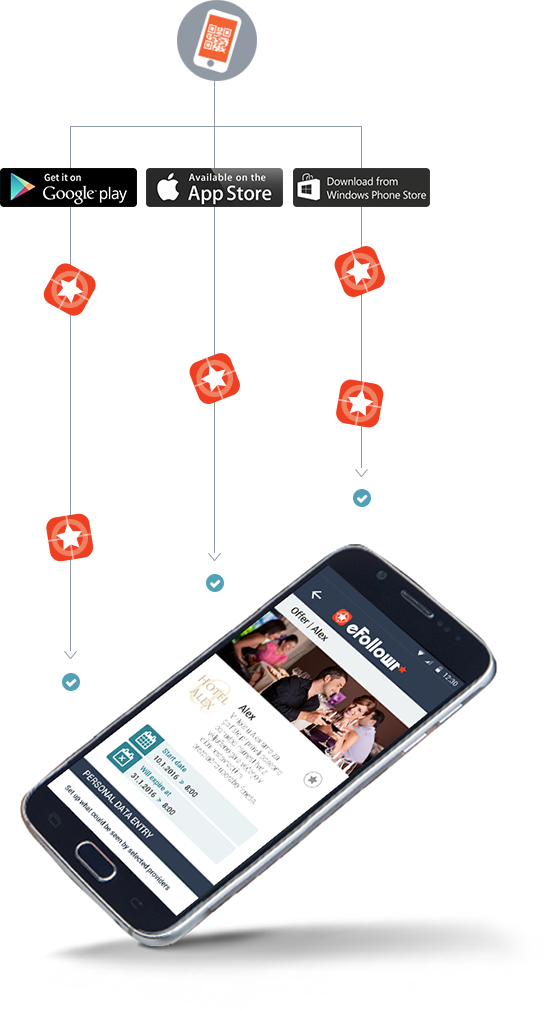
1 | Scan the QR code of the company you want to follow.
2 | The QR code of any provider, registered on eFollowr, will automatically redirect you to the online store (Google Play or App Store) where you can download the eFollowr app.
3 | Confirm and install the app. Voilà! It’s happening! After scanning the QR code, you will become a follower of the desired company and will be able to stay updated on all the news and offers of your favorite brands and companies.
2
Where do I find the QR code?
Using the QR code scanner, you are able to scan the QR codes:
AT THE BUSINESS LOCATION
Scan the QR code with your mobile device, found at your favorite business location.
Example: When you walk into a bakery or café, take a peek at the posters, the menu, the packaging, and the front door. The code can be placed anywhere and there should be a eFollowr logo next to it. If you cannot find the QR code, ask the owner.
ON THE eFollowr WEBSITE
Search for providers by clicking the link Search provider. Enter the name of the business in the field and scan the code with a QR code scanner.
ON FACEBOOK, GOOGLE OR TWITTER
The QR code of the provider can be forwarded to you by your friends,who have already installed the eFollowr app. The mobile app allows you to download QR codes on Facebook, Google+ and Twitter.
ON YOUR FRIEND’S MOBILE DEVICE
You can scan the QR code directly from another mobile device with a QR code scanner.
I don’t have a QR code scanner. What to do?
Go to your mobile store (Google play/App store), select "Search" and type in “QR code scanner”. Choose the first result and click “Install”. Open the app and scan the QR code of the provider using any of the methods described above.